
 Web Log Storming
 CD Label Designer
 MicroBiz Balance
  Grocify
 Agenda At Once PIM
 Decision Oven
 Software Development
 Web Design and Programming
 Examples of our Work




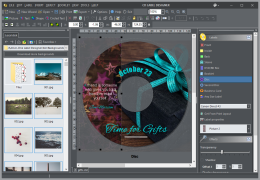 CD label makers are used by wide range of people: hobbyists and professionals, students and business people, musicians and developers, teens, parents and grandparents. Everyone must make a CD or DVD at least once in a lifetime. Still, it’s quite understandable that not everybody has same pocket depth. And what’s more important, not everybody earns money by making CDs.
That’s why we have decided to, at least for a while, offer number of options so you can get your own copy of CD Label Designer for free or with a significant discount. It’s totally legal and supported by officials, of course. 🙂
In return, we need a small favor from you. Lot of time has been spent to create this software, and giving it away just like that wouldn’t be so smart (regardless what some people tend to think). Instead, you can make a small effort and give us something in return.
Currently available options:
- Free: TrialPay
- Free: Blog or a website review
- 50% off: Forum post
- 50% off: Download.com comment
- 10%-50% off: Tell a friend
- 30% off: Competitive upgrade

If you have another idea, we will be glad to hear it. Feel free to contact us with a suggestion.
