Archive for the ‘Web Log Storming’ Category

Does our error reporting raise any privacy issues?

Friday, June 26th, 2009

Bookmark this story
bookmark bookmark bookmark bookmark bookmark bookmark bookmark

Recently we had an unpleasant communication with one of our users who claims that our application sent an error report to us without his consent. Needless to say, we really take a special care about your privacy from the day one of our existence, avoiding any “sneaky” practices that lot of companies utilized until few years ago, when they still weren’t illegal. Ethics is and was the first law that we choose to oblige to.

That’s why this kind accusations immediately raised our alarm and we started to test our bug reporting routine in order to find and fix this misbehavior as soon as possible. However, all our tests went fine and we couldn’t reproduce the problem this user is referring to.

Regardless of that, we have left open the possibility that there’s either a bug or a misunderstanding causing this, and tried to get more information from him. Unfortunately, not just that he was not able to help, but his e-mails also contained some contrastive descriptions, let alone an attitude that was preventing any rational communication.

Considering that, and the fact that no one ever complained about this issue before, we would like to be sure: has any of our applications ever sent a bug report to us without your permission? If yes, please let us know as soon as possible so we can take further actions.

What’s error reporting?

“Hunting” bugs and crashes without any details is a “mission impossible”, as all that you get is a description like “Access violation at address 004E046E in module ‘Application.exe’. Read of address 000001B4.” or “Range check error”. With these alone we can’t do much - they barely inform us about error type and nothing else. That’s why any developer who’s serious about building a stable software intended for distribution to wide audience can’t imagine doing it without some error logging library, either built in-house or purchased from another vendor. For this purpose we use great EurekaLog.

These reports usually contain basic information that could affect program running: operating system with a version, amount of RAM, HDD, processor type and speed, running processes, etc. Most useful part of this report is a so called call stack, which shows us exactly in which function of our code problem occurred and what other functions invoked it. Also, there’s more information useful only to some types of applications: computer and user name, LAN IP address, etc. Sometimes, when call stack doesn’t suffice to locate an error, there’s a assembler code, computer register values, short memory content  (from this specific application) and, if user agrees, a screen shot.

How does it work in our applications?

As error reporting function should be and is completely voluntary, if error happens the first window that you see looks like this:

First error reporting window

As you can see, there are two buttons at the bottom: “Send Error Report” and “Don’t Send“, so user has a clear choice to send it to us or not. There are also a two optional placeholders for your description and Email address (useful in case we have additional questions about the error).

In the middle of the window there’s also a “click here” link that you can use to inspect data this report contains before sending it. If you click on it, you’ll see a window like this:

Second error reporting window

At the left there are two checkboxes: “Send this error via Internet” and “Attach a Screenshot image“. By turning them off you can, once again, make a decision about sending. There’s also a convenient checkbox at the right (”Copy to Clipboard“), in case you want to send us error report manually by using your Email client (with some editing, if you wish).

It’s important to say that we don’t know who sent an error report, unless you explicitly leave us an Email address or name (in the first window) or send us a follow-up message pointing it out.

We hope that this article resolves any questions that our error reporting could raise, but feel free to contact us if you have any additional concerns.

Bookmark this story
bookmark bookmark bookmark bookmark bookmark bookmark bookmark

Web Log Storming survey - discount for participants

Wednesday, June 17th, 2009

Bookmark this story
bookmark bookmark bookmark bookmark bookmark bookmark bookmark

In order to improve our software and service, we would really appreciate if you could take few minutes of your time to anonymously answer 9 questions. In return, a 30% discount coupon is waiting for you on the last page! With 30% discount you can get Web Log Storming new license for $132 (US), or an upgrade for as low as $55 (US).

Note that coupon does not expire: you can get it now by taking a survey and use it whenever it’s convenient for you. On the other hand, survey will expire as soon as we collect enough data for analysis.

To properly understand and answer questions, you should have at least some experience with Web Log Storming. So if you didn’t already, please download and install 30 days evaluation version.

Download Web Log Storming

Take a survey and get a 30% discount

Bookmark this story
bookmark bookmark bookmark bookmark bookmark bookmark bookmark

Busting the Google Analytics Mythbuster

Friday, May 29th, 2009

Bookmark this story
bookmark bookmark bookmark bookmark bookmark bookmark bookmark

In the recent article at Google Analytics Blog author tries to bust several myths circulating in the public. You can find few half-truths and (intentional?) deceptions there that I simply can’t ignore.

As I mentioned earlier, Google Analytics could be a nice addition to the main analytics solution (even we are using it occasionally), providing that you don’t mind the baggage that comes with “free” label (What price Google Analytics?, Google Analytics - is it worth its price?, Google Analytics is not free, or search Google :) for more). JavaScript based systems give some information that log files can’t, but they also suffer from several drawbacks that are limiting the value if used alone.

As each product has its own audience, I won’t question anyone’s decision to choose one type of solution or another, but some things simply must be said, regardless of how many people will read this compared to the original article. :)

MYTH 1: “You get what you pay for.” Google Analytics is free, which means the system is down a lot.”

I do agree that GA system is not down very often (if ever). Why it would be? They have more than enough resources to keep it alive, and imagine how much data they would lose in just one minute of downtime. But no matter how powerful their servers are your website will inevitably be slower. I doubt that you’ll find this particularly alarming, but still…

MYTH 4: Google Analytics is not really accurate

Google Analytics uses JavaScript tags to collect data. This industry-standard method […] discrepancies greater than 10%, it’s due to an installation issue. Common problems include JavaScript errors, redirects, untagged pages and slow client-side load times.

[…]

All web analytics tools face the same technical limitations posed by JavaScript tags […]

Ouch. This one is a main motivation for me to write the article. I’ll just comment phrases in bold (in the order of the appearance).

  1. JavaScript tags are just one of methods used today. Even if we ignore custom in-house systems (based on whatever web developers use: PHP, ASP, Python, Ruby on Rails, …), pretending that still widely accepted server log file analysis don’t exist is at least an intentional delusion.
  2. Expected discrepancies of 10% or below among JavaScript based analyzers could be true, but compared to log file analysis, they show 2 to 5 times less traffic.
  3. It could be the installation issue only if visitors can be tracked with JavaScript. What about other traffic?
  4. Again, we can talk about errors and slow connection only when JavaScript tracking is possible.
  5. Saying that all web analytics tools face the same limitations is simply not true. JavaScript based web analytics tools do have these limitations, but not log file analyzers.

Pardon me if you don’t care about visitors that block JavaScript or click on a different link before tracking script is loaded, websites that directly link to images on your website, downloads of non-html files (PDF, ZIP, EXE, images, …), bandwidth usage, spiders, bots that pull down the whole website on a regular basis (wasting your bandwidth), direct access to scripts by hackers, etc, etc. Sure, with JavaScript analytics you can see trends and if you only care about marketing it could be good enough, but total number are not even close, and you can forget about other information that can be found in server log files.

MYTH 6: With Google Analytics you can’t control your data

Yes, you can control your data… at some degree. Google promises to resists the urge to analyze your data for own purposes (if you don’t forget to explicitly say so), but the fact is that they already have your data, right there. In this information era knowledge is a big asset. Sorry, but I don’t buy that they won’t ever “peek”, just a little. Probably under the excuse of “serving better search results” (or more likely, “serving better advertisements”). And I’m not talking about analytics only: they have search queries, e-mails, documents, appointments, instant messages, etc. They predicted Eurovision 2009 contest winner based on what people search and I should believe that they won’t silently use all the information they can for profits? Right…

Even if you do trust Google (and every its employee), you still can’t say that you fully control your data as it’s still on their servers. Anything can happen in the future. What if Google goes to bankruptcy? Okay, not likely, but possible. :) Therefore, you can’t fully control your data, but don’t get me wrong: I admit that there are few pros. For example, you don’t need to think about backup - the data is much safer on Google servers than on your computer. :)

* * *

Disclaimer: the purpose of this article is not to persuade anyone to use server log analyzer instead of Google Analytics (I wrote another article for this :) ), but to point out few things that are too easily overlooked these days, intentionally or not.

Bookmark this story
bookmark bookmark bookmark bookmark bookmark bookmark bookmark

Web Log Storming 2.0 final

Monday, May 25th, 2009

Bookmark this story
bookmark bookmark bookmark bookmark bookmark bookmark bookmark

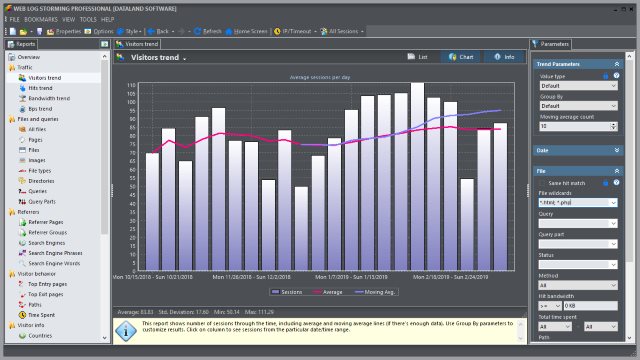
Web Log Storming screenshotWe have just released final version of our interactive web log analyzer (web stats) software Web Log Storming 2.0.

Web Log Storming is an interactive, desktop-based web log analyzer for Windows. A whole new concept of website statistics makes it clearly different from any other web log analytics software. Browse through stats to drill down into details - down to an individual visitor’s session. Check the pattern of individual visitor behavior and how it fits into your goals.

Web Log Storming does far more than just generate common reports. It displays detailed web site statistics with interactive graphs and reports. Complete and detailed log analysis of activity from every visitor to your web site is only a mouse-click away.

Version 2.0 introduces number of new features and improvements, including:

  • Goals
  • Tabbed reports
  • Six new report types (including cities and regions)
  • New parameters and global filters
  • Better speed and stability
  • Other usability / user interface improvements

To see what’s else new in this version, please visit this page.

What’s New in v2.0
Product Website

Bookmark this story
bookmark bookmark bookmark bookmark bookmark bookmark bookmark

Web Log Storming 2.0 Beta 2 available for download

Thursday, April 30th, 2009

Bookmark this story
bookmark bookmark bookmark bookmark bookmark bookmark bookmark

Thank you all for your suggestions and bug reports. We have released Beta 2 (build 481) with bugs fixed and few usability improvements.

As first beta proves itself rather stable (except one serious bug with Countries report, which is fixed now), next release will probably be final. If you haven’t already, now it’s a good time to consider special “early bird” offer .

Some of changes in Beta 2 (build 481) include:

  • Crash in Countries report with some log files
  • Hits and Bandwidth trend report combined with Path parameter fixed
  • In addition to F5, you can now refresh report by pressing Enter key in Parameters panel
  • Multi-select in log file location editor
  • Sample log files are updated

For download and more information visit this page.

Bookmark this story
bookmark bookmark bookmark bookmark bookmark bookmark bookmark


Products

Other links