Posts Tagged ‘software’

Please Help Little Andrew and Get a Free License

Sunday, February 28th, 2010

Andrew Knezevic

Update from 03/02: PayPal donations are possible now.

Update from 03/04: Current information. Please see below.

Update from 03/04: More products added to the offer (MySQL Debugger and several products from Dair Computer Systems)

Update from 07/03 and 08/03: Surgery went well, the tumor is malignant, but no metastasys. Hoping for the best.

I have a personal request to all people willing to help, and in exchange we’ll send you a free license for any of our software titles (Web Log Storming, Agenda At Once or CD Label Designer). Also, we want to thank George Schmidt and Dennis Reinhardt who both wish to join this effort by giving away a license for their products under same conditions: MySQL Debugger, HtmlApp Studio, DialogDevil and TelephoneMessagePad. Thank you, George and Dennis!

A friend’s 5-year-old son, Andrew (Andrej) Knezevic, has, unfortunately, been diagnosed with a brain tumor (dg. tu trunci cerebri). As we live in Serbia, a relatively underdeveloped country, the only possible treatment is a surgical operation that can be done in Zurich (Switzerland). However, the cost of this treatment is nearly 100,000 € that must be paid by his parents (see below for the current information). Needless to say, it’s the kind of money they, or most people here, don’t have. They already contacted various charity organizations, but responses are either slow or negative, and for this little kid every day matters.

That said, I would like to ask you kindly: instead of buying our software, please donate what you can to this family in order to help their boy getting better. There’s no minimum amount – now is not the time to be picky, as every dollar or euro means a lot.

After you do that, please submit a ticket message or leave a comment below and we’ll send you a license key. Please don’t forget to include an amount you’ve donated and the software title you are interested in.

For further information visit a Facebook group page (mostly in Serbian, with few English sentences) and feel free to forward this article to anyone you know (you can simply use Tweet button above or other social network buttons below).

Sincerely,
Vladimir Radmilovic
Dataland Software

Current information

Thank you all of you who helped Andrew in any way, either by donating, spreading a word or both.

03/03: As Andrew’s condition becomes worse with each day, the clinic accepted to do a surgery even though there is no enough money yet. At this moment he’s in Zurich and we are waiting for further news. There’s still need for about 50,000 €, so if you haven’t already, please consider contributing now or forward this post to you friends. Thank you in advance!

03/04: Andrew is currently on the intensive care and he’s feeling slightly better, thanks to therapy he’s receiving. Doctors expect that he will be ready for a surgery in few days. What’s most important, according to information currently available, the main surgeon is optimistic! Let’s hope that everything will be alright soon…

07/03 and 08/03: Thanks to all who participated, the 100,000 € checkpoint is reached and there was enough money for the surgery which took place on Saturday, March 6. Surgery went well but, unfortunately, the tumor is malignant. Later analysis shows that there is no metastasis, which is a good part of the news. Still, Andrew and his family will now need more money to finance a chemotherapy and other treatment, to return debts and regain property they sold. That’s why we will continue with this offer.

Andrew feels much better after the surgery. He’s not in the intensive care room anymore, he’s talking a lot, smiling and doctor is very satisfied how recovery goes so far. He’s a strong boy and we all hope and believe that he will beat the illness!

You can see latest photos here.

PayPal donations

Please go to PayPal transfer form and donate to an email address dmaci _AT_ bluemail.ch (of course, replace “_AT_” with “@”).

Spendenkonto (for donors from Germany)

MATIJEVIC/ANDREJ KNEZEVIC
Kontonr.: 4833783
BLZ : 505 922 00
Volksbank Dreieich eG
Verwendungszweck: Spende für Andrej

Payment instructions for wire transfer

Intermediary Bank/ Correspodent bank

SWIFT-BIC: DEUTDEFF

Name: DEUTSHE BANK AG

City, Country: FRANKFURT AM MAIN, GERMANY

Account whit institution/ Beneficiary’ s Bank

SWIFT-BIC: KOBBRSBGFSO

Name: KOMERCIJALNA BANKA A.D. BEOGRAD

Street: Svetog Save 14

City, Country: Belgrade, Serbia

Beneficiary

IBAN/Account Number: RS35205903101160712320

Name: JELENA KNEZEVIC

Street: Sv.Miletica 6

City, Country: Stanisic, Serbia

https://cms.paypal.com/us/cgi-bin/?cmd=_render-content&content_ID=marketing_us/send_money

How to Track Custom Variables in Web Statistics

Monday, October 19th, 2009

Recently I found few interesting questions about how to track custom variables with Google Analytics. The question well makes sense, even if your website is not a complex web application that your visitors log in to. “Simple” showroom websites could benefit from such kind information too, providing that you want to learn more about visitor behavior grouped by data not already included in stats. Here’s an example of how you can do this with Web Log Storming, but you might apply similar steps if you use some of other tools too.

Let’s say that you run online shoe-shop. At some point, you decide to present a simple survey to your visitors and put results into cookie information. In this case, you would probably be interested in demographic information such is gender, age, marital status, etc.

Disclaimer: I’m completely ignorant about selling shoes (Al Bundy would probably know better), so don’t mind if I completely missed what matters in this business. :)

Setting up a website

Step 1. Building a survey

Real shoe storeFirst thing you need to do is to actually build a survey. How to do that is beyond scope of this article, so I’ll leave it to you. But all surveys have something in common: they contain questions. Let’s say that questions for this example are:

  1. Gender (Male / Female)
  2. Age (20-ies / 30-ies / 40-ies / 50-ies / 60-ies…)
  3. Marital status (Single / In relationship / Married / …)

You get the picture. Put answers into a cookie and you’re ready for the next step.

Step 2. Logging this information

If these individual answers stay in visitor’s local cookies, you won’t be able to use them. It’s actually easy to “trick” a web server to write them down for you, and here’s how.

First, create a transparent 1×1 pixel gif image and upload it to your server (for example: myvars.gif). For your convenience, you can get one from here (right-click on link and save image).

Now change your web pages (or just one of them, depending how your website is organized) to include code into header or footer, similar to this:

<img src="/path-to/myvars.gif?g=<?php $_COOKIE['gender']; ?>" />
<img src="/path-to/myvars.gif?a=<?php $_COOKIE['age']; ?>" />
<img src="/path-to/myvars.gif?s=<?php $_COOKIE['status']; ?>" />

You would probably want to replace $_COOKIE[ ] parts with your functions, but we’ll keep it as simple as possible here.

These images will be invisible to visitors, but your log files will from now on contain lines like these:

1.2.3.4 [18/Oct/2009:22:20:06 -0600] "GET /myvars.gif?g=female HTTP/1.1" 200 ...
1.2.3.4 [18/Oct/2009:22:20:06 -0600] "GET /myvars.gif?a=40 HTTP/1.1" 200 ...
1.2.3.4 [18/Oct/2009:22:20:06 -0600] "GET /myvars.gif?s=married HTTP/1.1" 200 ...

Note the emphasized parts behind question marks. Instead of placing an image for each variable separately, you can combine them into one request, so your get ?g=female&a=40&s=married. It’s up to you how you want to track them later.

Now we only need to extract these into a meaningful statistics.

Extracting and analyzing custom variables

As I said before, it might be possible to analyze this info with other products (although often with limited possibilities), but here we’ll show how you can do that with Web Log Storming. For purely selfish reasons, of course. :)

Custom variables in Web Log StormingFirst, you can use Queries report to see how popular each survey option is. If you define your Goals in this report you’ll also be able to see how well each of visitor groups convert.

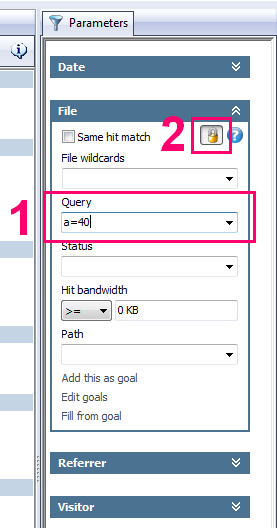
Next and even more important, you can set up a Query parameter to focus on specific groups and analyze them separately. With Web Log Storming it’s really easy to do that (see the screenshot):

  1. Type a filter into Query parameter (for example: “a=40″) and hit Enter. Whatever report you have active at this moment, it will now be based on visitors in forties only.
  2. Optionally, click Lock button to base all other reports you select on the same set of visitors, until you explicitly remove this filter.

It’s simple as that, but there’s more possibilities for advanced filtering by combining more than one group, comma separated. Here are few examples as an illustration:

  • s=married, s=relationship
    All visitors either married or in a relationship
  • s=married, s=relationship, +g=male
    All male visitors either married or in a relationship (note the “+” sign)
  • g=female, -s=divorced
    All female visitors who are not divorced (again, note the “-” sign)
  • +a=30, +s=divorced
    All divorced visitors in their thirties

There are numerous combinations and possibilities, and for more info how wildcards work in Web Log Storming, check this page in the user manual.

Note: if you decided to combine all variables into one request (ie. ?g=female&a=40&s=married), you’ll need to enclose filters in wildcard (asterisk) character, like this: *a=40*, +*g=male*.

How to use these insights or “Why should I care”?

Common sense tells us that our website should “push” male shoes to males and female shoes to females, right? But is it possible that it’s not the best choice? What if your analysis show that married middle-aged males often buy shoes to their spouses as a gift? You would definitely want to make it easier for them to do so.

Or maybe you discover that divorced people, regardless of age, are more likely to buy more expensive shoes, so shouldn’t you present them an appropriate offers? Or maybe this doesn’t apply to divorced people in their sixties? Maybe people in sixties are generally not interested in expensive shoes, regardless of marital status?

There is lot of questions which all make sense to me, but I’ll just stop – if someone told me month ago that I will spend this much time thinking about shoe market… ;) Besides, I’m sure you understood the importance of visitor segmenting buy now and that you know what questions relate to you business.

Links

Web Log Storming website
Web Log Storming 30-day trial download

The Remedy for a Web Analytics Headache

Monday, October 12th, 2009

According to “The Web Analytics War Reader Survey” by Unica, as published on eMarketer website (The Web Analytics Headache), lot of marketers have problems with their current web analytics solutions. This is a breakdown of the results:

Biggest challenges of web analytics Biggest issues related to Verifying Accuracy

Could our Web Log Storming be the remedy for at least part of those? Let’s see…

1. Verify accuracy of data (41%)

This is a major issue, and, to be honest, we are glad so many people are aware of it. :) Second graph above shows specific reasons.

a) Can’t drill into the data to verify numbers (42%)

Web Log Storming is all about drilling into details. It allows you to to actually see list of sessions/visitors (filtered by any metrics) and all available details of each one of them (visitor data and individual hits). This allows you to react and easily exclude those you don’t wish to affect your statistics (for example, spiders, yourself, your employees, etc).

b) Marketing attribution issues (32%) and Campaign tracking code issues (25%)

These are actually related to other accuracy problems (due to JavaScript and code problems, hits that JavaScript analyzers are unable to track, etc). As web servers log every single request, the risk of losing data is minimal. In fact, most argue that log analyzers are useless because of this, as people are generally not interested in spiders and similar “dummy” traffic. I partially agree: other analyzers  might be useless, but Web Log Storming’s ability to drill-down and easily filter out those is of utmost importance.

Back to the topic: with Web Log Storming you can define goals any way you like, as opposed to GA which allows you to assign a goals to pages only. Goal can be a page, sequence of pages, query, an image accessed from a third-party website (useful if you confide payments to specialized services), bandwidth usage, etc.

After setting a goal, every report shows conversion totals and percentages for each presented item (referrers, periods, pages, user agents, …) .

c) Issues with cross-site analysis (20%)

One solution for cross-site analysis is already mentioned in previous point: embed an image from your web server in a third-party web page (it can be white 1×1 pixel gif, invisible to visitors) and all hits to that page will be noted in your stats.

However, if you actually own and run several related websites, it would be nice if you could analyze them together. It’s not a problem for Web Log Storming. You should already have access to server logs, and all you need to do is to include them into the WLS project. It’s not even necessary for those websites to be on the same server – you can combine stats from IIS and Apache servers into joined reports. To easily distinguish hits from different websites, just use a Prefix option (/website1/index.html, /website2/index.html).

d) Can’t look up definitions of metrics and reports (19%)

In Web Log Storming, we tried to use as little technical terms as possible, and they are explained in a user manual page. By default, each report is described with one or two sentences at the bottom of the window, and user manual contains more detailed descriptions. Maybe it’s not enough, but we would like to hear any ideas for further improvements.

e) Issues with cookies (11%)

Web Log Storming doesn’t use cookies. But wait, don’t reach for a comment form yet: cookies do have their advantages over IP-based unique visitor detection, but vice-versa is true too. Which one gives better results? It probably depends on a website and profile of visitors. Here are few considerations to think about: more and more visitors use a broadband connection (with relatively static IPs), more and more visitors set up browsers to delete cookies, number of visitor that bring a laptop to another network is probably still outnumbered by visitors who use different computers on a different networks, etc.

You should really decide for yourself on this one… Point a) above (drilling down) should help you with it.

2. Not comprehensive/missing types of data (32%)

Some data is not possible to track with Web Log Storming, and it’s mainly related to client-side specifics, such is screen resolution, window size, JavaScript support, etc. This is purely because of technical limitation of server log files (this info doesn’t exist). If you really need them, you can always install some free JavaScript code. For everything else, there’s Web Log Storming. :)

3. Budget is too small to be useful (29%)

I must admit that I’m not sure if I understood this one. I suppose that it’s related to the fact that free stuff is rarely good enough and other solutions are too expensive to consider? Well, Web Log Storming is really not that expensive (some say it’s too affordable for the value it provides). There’s no recurring fees and, once you buy a license, you can use it freely forever. You get free upgrades for certain time and, after that period, you can stay with version you own without paying a single cent, unless you decide that improvements are worth the upgrade price (which is discounted, of course).

4. Page tagging difficulties or magnitude of effort (19%)

There’s no page tagging in Web Log Storming as it uses server log files, which almost all hosting companies provide (if it doesn’t, consider switching – seriously, as chances are that this is not the only problem you have with them). This is important, not just because for most people it’s easier to download log file than to edit pages or templates. Other benefits of not-tagging are:

  • Log files (and thus statistics) exist even before you include tags.
  • If you switch from one tag-based solution to another, you can kiss goodbye old data. If you switch from any kind of solution to a log-based solution, you still get all stats from the past. You’re not locked-in in any way.
  • Code errors: omit a single but vital character and stats won’t work.
  • Put a script code at the end of the page (as GA people suggests), and you risk that visitor will click away before page is fully loaded, resulting in lost hits.
  • Put a script code at the beginning of the page and your website will become sluggish. Actually, total load time would be the same, but there’s more chance that visitors won’t notice it if code is at the end.
  • Did you know that some people love to block Google Analytics and other similar tags?

5. Customer service issues (6%)

We are small company. Small companies, by definition, try harder. Every single customer and potential customer matters to us and we will commit any reasonable effort to make our software work for you in a way you want. We listen and welcome any new ideas and pursue any problem that you might have. Emails are responded by developers, not some independent (incompetent?) customer support service.

Yes, that’s a promise.

6. Vendor/solution/dashboard is too difficult to use (6%)

Not everyone can set up a separate job place for an analytics specialist (and, according to the survey, 72% of contenders don’t). Initially, we made Web Log Storming for ourselves, and made it reasonably understandable and easy to use for people who’s job title doesn’t contain “analytics” word. Part of this benefit lies in its interactivity, allowing you not to dedicate your life to predict what information you will need in the future. When you get a new idea, just dig out  that information from existing log files. That makes Web Log Storming a perfect solution for small businesses – get the right information at the moment you need it.

Conclusion

If I would want to play silly, I would say that it’s now proved that Web Log Storming is 159.09% better than any other web analytics solution. ;) But seriously, everyone should ponder all available options and choose what works best for them.

Web Log Storming is a server log file analyzer, and, according to some previous blog comments and feedback, that appears to be a deal-killer for some people. It’s understandable. Google’s marketing machinery is slightly stronger than ours, and nobody gets fired by recommending IBM, Microsoft or Google. :) Sure, JavaScript solutions have own advantages, but please, hold back from putting Web Log Storming in a same basket with other log analyzers, at least not for now. If you wish to disagree with this post, it would be reasonable if you download and install free 30-days trial first, before forming and sending an opinion. Any critics directly related to our product are welcomed. Thank you for understanding! :)

Links

Web Log Storming web site
Download Web Log Storming free 30-days trial

Similar articles

Which web log analyzer should I use?
10 strengths of web log analyzers compared to JavaScript based analytics
Busting the Google Analytics Mythbuster

How to Easily Exclude Unnecessary Hits in Web Log Storming?

Thursday, August 27th, 2009

Excluding unnecessary hits from Web Log Storming reports by using global filters is an effective way to improve software performance. Newly added option in version 2.2 makes this process easier. Please read this short tutorial to see how to use it.

How to Easily Exclude Unnecessary Hits?

Web Log Storming v2.2 is available for download

Monday, August 24th, 2009

Web Log Storming v2.2 is now available for download. Changes in this release include several small new features, improvements and bug fixes.

New option for file reports: Add to Global Filters

Add files to global filtersNow you can more easily add unnecessary files to global filters (see “Improving performance” suggestions). To use it, view any of file reports (pages, files, images, directories, etc), see which files take lot of hits that doesn’t affect your stats (style sheets, logo images, etc), right click on them and choose “Add to Global Filters” option. Next time you read log files these will be excluded from reports.

New option: Manually Edit Host Name

This one is available in Sessions, Domains and Session Details report. You can now change visitor’s domain name to any text you like, so instead of having something like qwerty123456.domain.com, you can describe visitors as My home network or Important customer.

Introducing two editions: Standard and Professional

If you don’t need some of options, you can now buy less expensive Standard edition of Web Log Storming. Currently, Standard edition costs $119 (US) while Professional remains at the same price point ($189). Removed features include goals, host resolving, exchange options (export, print, send by e-mail, …), some reports, etc. For full list of differences please refer to this page.

Upon start, users who are evaluating trial version can choose which edition they want to try out. Existing customers won’t notice any change from this as all of you already have Professional version.

Other changes

Other less important  improvements and bug fixes.

Links:
Web Log Storming home page
Download an update
Compare editions


Products

Other links