Deal with it: software can’t be free forever

In just few days I’ve came across three examples of how “software for free” model hardly works, at least for developers. One of them is tr.im, the service to shorten long URLs. According to their blog, they’ve unsuccessfully tried to find an investor for their service. Of course, without proper funding, why would they spend any more time on it? And moreover, who will pay for hosting and other administrative fees? Second example is a project management / source control service codespaces.com. They recently decided to cease free plan and started charging $3 for it.

Another popular example is a great instant messaging client Digsby. They are trying to find a sustainable reason to continue developing it, and, as it seems, they plan to do that by displaying advertisements. In my opinion it’s a wrong method. So called “adware” model was popular about 10 years ago and it failed miserably. What happened now is that part of the community is actually angry on Digsby management. Can you believe it?

Related joke

One man was giving a $100 bill to a beggar every single day. After some time, those 100 bucks gradually became 50, 40, 30, and finally one day he gave him only $10.

B: Excuse me, sir. Can I ask you something?
M: Sure!
B: How come you always gave me $100 and now it’s only $10?
M: Well, you know, in the meantime I got married and we got a kid, our expenses are much higher now, we are building a new house…
B: A house? You are building a house? With MY money???

There simply must be a way of paying those developer-days/months/years or the whole project is doomed. Just browse some of Open Source repositories and check how many software sits abandoned. Alas, developers must eat too. 🙂 Some businesses succeeded to persuade Venture Capitalist to initially invest money for the development, but sooner or later this VC will stop throwing funds away and expect the return of this investment. It’s simply how economy works, like it or not. As some have predicted before, this whole “software should be free” bubble will burst, and it’s now becoming evident for those who didn’t believe it.

Before someone says “electrons are free so software should be too”, here’s few considerations to think about:

  1. Developer’s time is not free
  2. Your time is not free
  3. Knowledge (education) is not free
  4. Equipment (computers) is not free
  5. Electrons are not actually free either (you still must pay for web hosting)
  6. Nobody works for free unless someone else pays their bills (parents, for example)

So there’s really no point arguing on this. Lawyers don’t charge just for cost of a peace of paper, taxi drivers don’t charge just for a gas, professional football players don’t play for free, cars are not priced just on value of raw materials – the list can go on and on. So why then some people think that developers should charge just for a CD?

Of course, some free-to-use software will always exist, but in a long term, it must pay off in one way or another. Being it through  consulting and support (applicable for enterprise markets), advertisements, information access (various Google products), offering a premium version, or whatever works in a specific case.

So, people, you have no right to assume to get something for nothing – at least not forever…
Web Log Storming: up to 40% competitive discount

In addition to an educational 30% discount, we have just announced a competitive discount of 20% or 40% (depending on product). We believe that this could be a nice opportunity to either switch to Web Log Storming or to use it as an additional analytics tool. You just need to send us a screen shot with a proof – it could be a picture of the About box with your name in it (if it’s a desktop solution) or a picture of a web page for a hosted solution.

For paid packages (either desktop or hosted) the discount is 40%, which means that you can get new Web Log Storming license for only $113.40 (US).

And this could surprise you. The discount is currently available even if you use free analytics package, but with an additional condition: you must use it for at least two months (make sure you set date range accordingly when taking a screen shot). In this case discount is 20% and your price would be $151.20 (US).

The offer is also available for the upgrade from old version of Web Log Storming ($47.40 / $63.20).

Visit Web Log Storming website for more information

10 reasons why web log analyzers are better than JavaScript based analytics

In this article we are going to point out some objective strengths of web server log analysis compared to JavaScript based statistics, such is Google Analytics. Depending on your preferences and type of the website, you might find some or all of these arguments applicable or not. In any case, everyone should be at least aware of differences in order to make a right decision.

1. You don’t need to edit HTML code to include scripts

Depending on how your website is organized, this could be a major tasks, especially if it contains lot of static HTML pages. Adding script code to all of them will surely take time. If your website is based on some content management system with centralized design template, you’ll still need to be careful not to forget adding code to any additional custom pages outside this CMS.

2. Scripts take additional time to load

Regardless of what Google Analytics officials say, actual experiences prove otherwise. Scripts are scripts and they must take some time to load. If external file is located on a third-party server (as it’s the case with Google Analytics), the slowdown is even more noticeable, because visitor’s browser must resolve another domain.

As a solution they suggest putting inclusion code at the end of the page. Indeed, in that case it would appear that page is loaded more quickly, but the truth is that there’s a good chance that visitor will click another link before script is executed. As a result, you won’t see these hits in stats and they are lost forever.

3. If website exists, log files exist too

With JavaScript analytics, stats are available only for periods when code was included. If you forget to put code on some pages, the opportunity is forever lost. Similarly, if you decide to start collecting stats today, you’ll never be able to see stats from yesterday or before. Same applies to goals: metrics are available only after you decide to track them. With some log analyzers, you can freely add more goals anytime and still be able to analyze them based on log files from the past.

4. Server log files contain hits to all files, not just pages

By using solely JavaScript based analytics, you don’t have any information about hits to images, XML files, flash (SWF), programs (EXE), archives (ZIP, GZ), etc. Although you could consider these hits irrelevant, they are not for most webmasters. Even if you don’t usually maintain other types of files, you must have some images on your website, which could be linked from external websites without you knowing anything about it.

5. You can investigate and control bandwidth usage

Although you might not be aware of it, most hosting providers limit bandwidth usage and usually base their pricing on it. Bandwidth usage costs them and, naturally, it most probably costs you as well. You would be surprised how much domains (usually from third-world countries) poll your whole website on a regular basis, possibly wasting gigabytes of your bandwidth every day. If you could identify these domains, you could easily block their traffic.

6. Bots (spiders) are excluded from JavaScript based analytics

Similar as previous point, some (bogus) spiders misbehave and they are wasting your bandwidth, while you don’t have any benefit from them. In addition, server logs also contain information about visits from legitimate bots, such are Google or Yahoo. By using solely JavaScript based analytics you have no idea how often they come and which pages they visit.

7. Log files record all traffic, even if JavaScript is disabled

Certain percentage of users choose to turn off JavaScript, and some of them use browsers that don’t support it at all. These visits can’t be identified by JavaScript based analytics.

8. You can find out about hacker attacks

Hackers could attack your website with various methods, but neither of them would be recorded by JavaScript analytics. As every access to your web server is contained in log files, you are able to identify them and save yourself from damage (by blacklisting their domains or closing security holes on your website).

9. Log files contain error information

Without them, in general case, you don’t have any information about errors and status codes (such are Page not found, Internal server error, Forbidden, etc.). Without it, you are missing possible technical problems with your website that lower overall visitor’s perception of its quality. Moreover, any attempt to access forbidden areas of your website can be easily identified.

10. By using log file analyzer, you don’t give away your business data

And last but not least, your stats are not available to a third-party who can use them at their convenience. Google has bought all rights for, at that time, popular and quite expensive web statistics product (Urchin), repackaged it, and then allowed to anyone to use it for free. The question is: why? They surely get something in return, as Google Analytics license agreement allows them to use your information for their purposes, and even to share it with others if you choose to participate in sharing program.

What could they possibly use? Just to give few obvious ideas: tweaking AdWords minimum bids, deciding how to prioritize ads, improving their services (and profits) – all based on traffic data collected from you and others.

Related links

Busting the Google Analytics Mythbuster
Which web log analyzer should I use?
What price Google Analytics? (by Dave Collins)
Web Log Storming – an interactive web log analyzer

Error window redesigned

In our last post we have asked if anyone else suspects that we have received error report without his permission. So far, no one reported it yet and, as we have committed to extensive testing, we have all reasons to believe that it’s not a bug in our system that caused this unfortunate event but an isolated incident (although we are still open to any feedback that could suggest otherwise).

What happened is most surely an unintentional and accidental confirmation by this user who complained. Nevertheless, we apologize for the inconvenience to anyone who might have experienced same thing. Also, anyone who sent us a bug report is and always was informed about what’s happening: by window that shows sending progress and by information message box that stays on screen until users closes it. In other words, there is no chance that you’ve sent a bug report without knowing it happened.

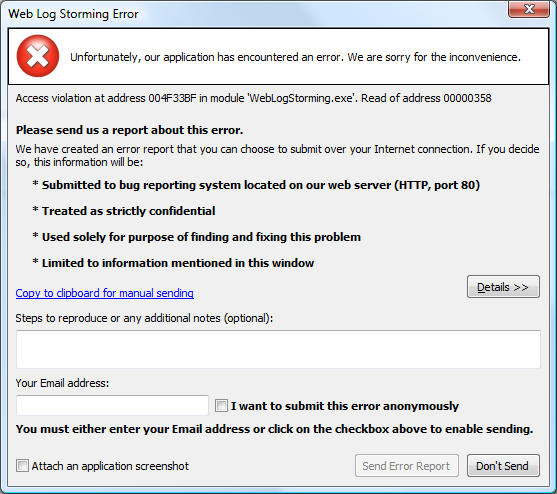
Regardless, we are doing whatever is reasonable in order to reduce a possibility that this ever happens again, hopefully to zero. Firstly, because of your peace of mind and, secondly, because of our own peace of mind. After several iterations we finally settled down with this layout:


We are confident that the possibility of accidental error submission is now completely eliminated. As you can see, the Send button is disabled and it will remain so until you enter a valid Email address or click on I want to submit this error anonymously check box. We have also emphasized details about the whole process that will some users surely find important (such are statements about confidentiality, purpose and method of sending).

Update is already uploaded to the server, so feel free to download it.

Does our error reporting raise any privacy issues?

Recently we had an unpleasant communication with one of our users who claims that our application sent an error report to us without his consent. Needless to say, we really take a special care about your privacy from the day one of our existence, avoiding any “sneaky” practices that lot of companies utilized until few years ago, when they still weren’t illegal. Ethics is and was the first law that we choose to oblige to.

That’s why this kind accusations immediately raised our alarm and we started to test our bug reporting routine in order to find and fix this misbehavior as soon as possible. However, all our tests went fine and we couldn’t reproduce the problem this user is referring to.

Regardless of that, we have left open the possibility that there’s either a bug or a misunderstanding causing this, and tried to get more information from him. Unfortunately, not just that he was not able to help, but his e-mails also contained some contrastive descriptions, let alone an attitude that was preventing any rational communication.

Considering that, and the fact that no one ever complained about this issue before, we would like to be sure: has any of our applications ever sent a bug report to us without your permission? If yes, please let us know as soon as possible so we can take further actions.

What’s error reporting?

“Hunting” bugs and crashes without any details is a “mission impossible”, as all that you get is a description like “Access violation at address 004E046E in module ‘Application.exe’. Read of address 000001B4.” or “Range check error”. With these alone we can’t do much – they barely inform us about error type and nothing else. That’s why any developer who’s serious about building a stable software intended for distribution to wide audience can’t imagine doing it without some error logging library, either built in-house or purchased from another vendor. For this purpose we use great EurekaLog.

These reports usually contain basic information that could affect program running: operating system with a version, amount of RAM, HDD, processor type and speed, running processes, etc. Most useful part of this report is a so called call stack, which shows us exactly in which function of our code problem occurred and what other functions invoked it. Also, there’s more information useful only to some types of applications: computer and user name, LAN IP address, etc. Sometimes, when call stack doesn’t suffice to locate an error, there’s a assembler code, computer register values, short memory content  (from this specific application) and, if user agrees, a screen shot.

How does it work in our applications?

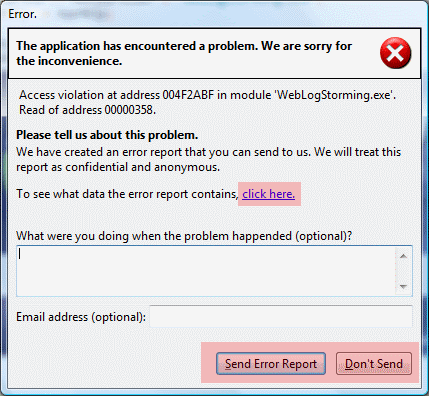
As error reporting function should be and is completely voluntary, if error happens the first window that you see looks like this:

First error reporting window

As you can see, there are two buttons at the bottom: “Send Error Report” and “Don’t Send“, so user has a clear choice to send it to us or not. There are also a two optional placeholders for your description and Email address (useful in case we have additional questions about the error).

In the middle of the window there’s also a “click here” link that you can use to inspect data this report contains before sending it. If you click on it, you’ll see a window like this:

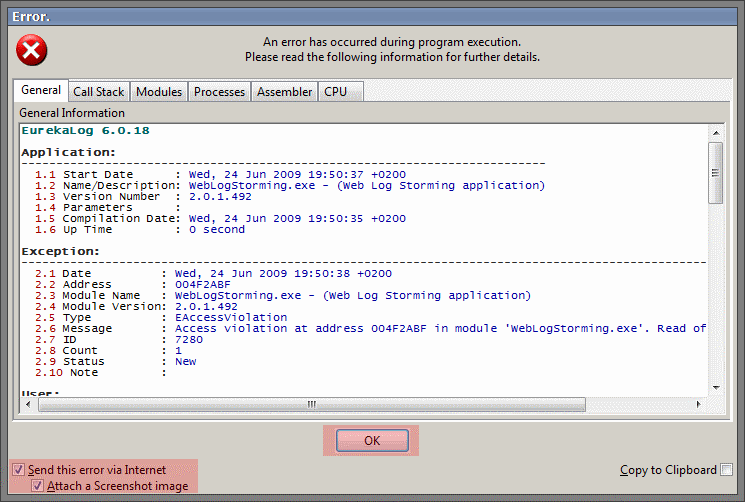
Second error reporting window

At the left there are two checkboxes: “Send this error via Internet” and “Attach a Screenshot image“. By turning them off you can, once again, make a decision about sending. There’s also a convenient checkbox at the right (“Copy to Clipboard“), in case you want to send us error report manually by using your Email client (with some editing, if you wish).

It’s important to say that we don’t know who sent an error report, unless you explicitly leave us an Email address or name (in the first window) or send us a follow-up message pointing it out.

We hope that this article resolves any questions that our error reporting could raise, but feel free to contact us if you have any additional concerns.